OfficeCalendar is easy to install, setup, and use; and offers a highly cost effective alternative to Microsoft Exchange Server for Microsoft Outlook calendar sharing. Whether you have a computer dedicated as a network server or a basic Windows-based peer-to-peer network, OfficeCalendar can easily be installed and used in your office.
Once set up, our product allows you to share and interact with Microsoft Outlook calendars, email, contacts and tasks that are stored in your colleague's Outlook Personal Folders right from within your own copy of Outlook. OfficeCalendar gives you shared calendar and interactive group calendar software functionality from within the software interface that you already know and are familiar with: Outlook. Plus, there's no need to purchase additional computer hardware or expensive server software to make it work. Everything you need to share Microsoft Outlook calendars, create Outlook group calendars, and setup inter-office calendar sharing security, and more is included in our software application. All you need is a copy of Microsoft Outlook 2000 or higher on each user's computer that wishes to share their Outlook calendar, email, contact, and task information; and a Windows-based computer network.
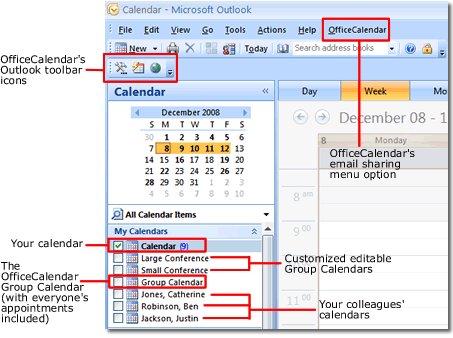
With OfficeCalendar you can:
Web access to your Outlook calendars, contacts and tasks is convenient from anywhere or anytime with OfficeCalendar Online.
This valuable feature is available to users subscribed to the OfficeCalendar Premium Maintenance & Upgrade Protection Plan, and allows you to view, edit and delete your personal and shared Outlook calendars, contacts and tasks just as you would from your own copy of Microsoft Outlook. OfficeCalendar sharing security applies to OfficeCalendar Online as well, ensuring that you can only see online what you can see in Microsoft Outlook. Synchronization is a two-way process with OfficeCalendar Online, so your Outlook folders online always match those in Outloook and vice versa.
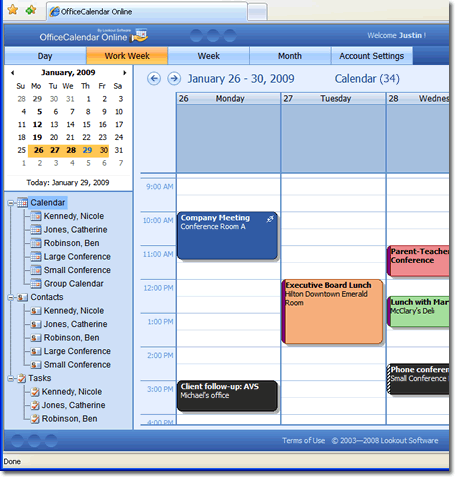
For more details about OfficeCalendar Online, view our Outlook web access page.
Share Outlook Calendars, Email, Contacts, and Tasks remotely over the Internet
Also, with OfficeCalendar you can share Outlook calendar, email, contact, and task information while working remotely over an Internet connection. OfficeCalendar's unique .NET technology makes it easy for employees working from home, remote offices, or traveling out of town to connect to your office's central OfficeCalendar server to send and receive updates as often as they like.
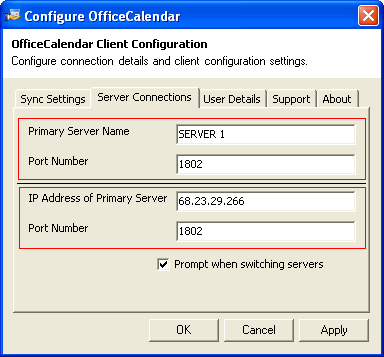
For more details on what is required and how to setup OfficeCalendar Internet synchronization, view our Internet calendar sharing with OfficeCalendar page.
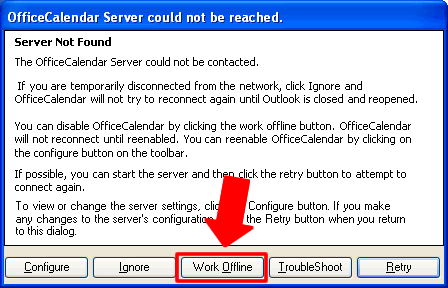
Share Outlook Calendar, Email, Contact, and Task information even when you aren't connected to your Office's Network or the Internet with OfficeCalendar's "Work Offline" feature.
Laptop users can enjoy the freedom of working from home or on the road and can still share Outlook calendar, email, contact, and task information with their colleagues; even when they are not connected to the office network or the Internet with OfficeCalendar. Because OfficeCalendar stores shared calendar, email, contact, and task information in each users' Outlook personal folder database (PST) it's always available to view and edit.
Additional Product Information:
|