OfficeCalendar saves you money!
|
|
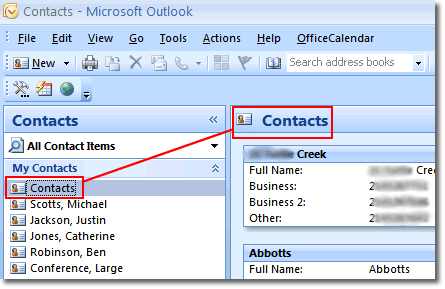
The end-user interface for OfficeCalendar is your existing Microsoft Outlook software. Upon installation, OfficeCalendar will create additional sets of contacts under your main set of contacts. You will be able to view the Outlook contacts for all of the people that your security rights allow. They in turn will see your Outlook contacts if they have the security rights to do so.
In this screenshot, the icon for your Contacts folder is highlighted on the left-hand side of the screen, within the Outlook folder list. Directly under your Contacts folder are additional Contact folder icons with names to the right. Clicking on one of these names or Contact folder icons will take you to that individual's personal list of Outlook contacts.
SHARE OUTLOOK CONTACTS SCREEN 2 >>
|
|
Microsoft and the Office logo are trademarks or registered trademarks of Microsoft Corporation in the United States and/or other countries.