OfficeCalendar saves you money!
|
Access Outlook calendars, contacts and tasks via the web with OfficeCalendar Online
OfficeCalendar Online provides the functionality to view your Outlook calendars, contacts and tasks via the web, from anywhere at anytime. Just like accessing Outlook folders on your desktop, OfficeCalendar Online allows you to see, edit and delete your personal and shared Outlook calendars, contacts and tasks Online via a web browser. This feature is exclusive to OfficeCalendar Premium Maintenance & Upgrade Protection Plan subscribers and provides an invaluable way for those who need constant access to Microsoft Outlook to see and modify their schedules, contact information and task lists but simply do not have access to their computer with Microsoft Outlook installed due to travel, working from home, or other reasons.
Accessing your Outlook calendars is easy and works just like it does in Microsoft Outlook; choose from Day, Work Week, Week and Month view settings to fit your viewing needs. Contacts can also be filtered alphabetically online to make it easier to find a specific colleague’s information.
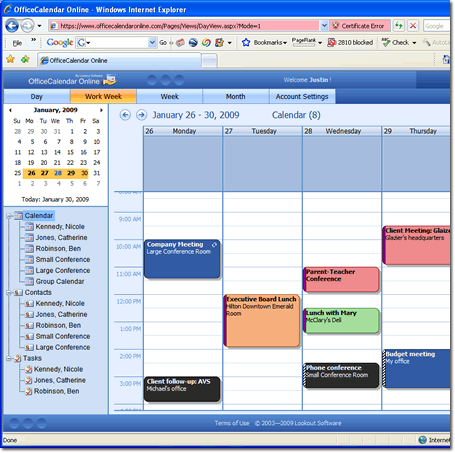
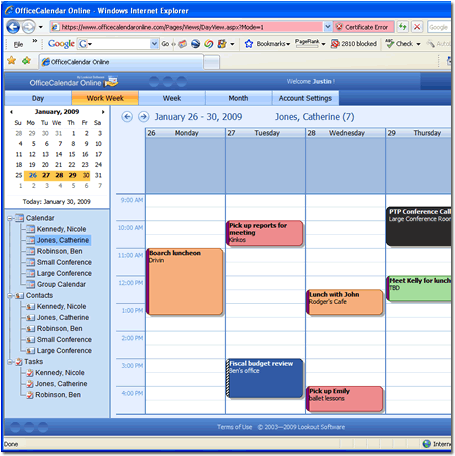
Outlook web access is made simple with OfficeCalendar Online. Not only can you access your personal Outlook folders, but all of your shared Outlook calendar, contacts and task folders are listed as sub-folders in your OfficeCalendar Online account interface. By simply clicking on a colleague's name, group calendar or resource user under your Calendar folder online, you can view, change or delete the information stored in that folder just like you would in your own copy of Outlook. Security measures remain in tact, ensuring that users can not access
All changes made to your Outlook calendars, contacts and tasks while online are synchronized back to your copy of Outlook, ensuring that no matter where or how your access your Outlook calendars, contacts and tasks; they are always up-to-date.
Additional OfficeCalendar Resources
|
|
Microsoft and the Office logo are trademarks or registered trademarks of Microsoft Corporation in the United States and/or other countries.