OfficeCalendar saves you money!
|
|
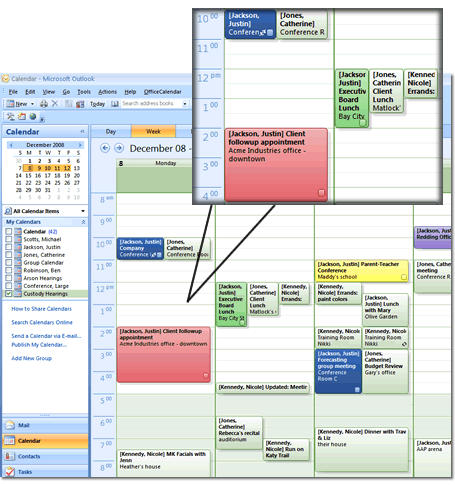

The first screenshot shows the newly created "Custody Hearings" group calendar in Nicole's Outlook Calendar folder list upon her first OfficeCalendar synchronization after the "Custody Hearings" group calendar was added by the OfficeCalendar administrator.
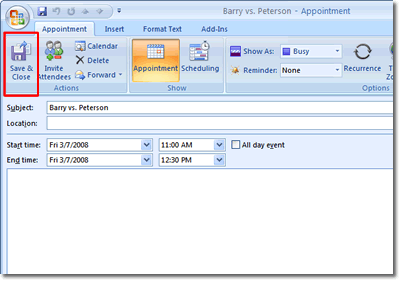
Users can create appointments in a group calendar the same way they would create an appointment in any other Outlook Calendar folder. In the example below, Nicole will create an appointment in the group calendar "Custody Hearings". The second screenshot shows Nicole adding an appointment just like she would in any other Outlook Calendar folder.
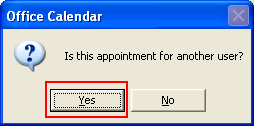
However, upon saving the appointment, Nicole is prompted by OfficeCalendar from within Outlook with a message asking her if the appointment is for another user, as the third screenshot shows.
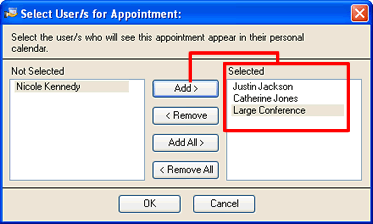
If Nicole selects Yes, another dialog box will appear allowing her to select one or more users associated with the new appointment, as shown in the fourth screenshot above. The only users and resources available for selection are those users and resources that have been configured as In Group within the Group Calendars configuration screen (in the OfficeCalendar Server and Administration Console).
The appointment Nicole created gets added to the "Custody Hearings" group calendar three times; once for each specified user/resource showing the name of the user or resource in which the appointment is associated in brackets next to appointment's subject as shown in the final screenshot.
OUTLOOK GROUP CALENDARS SCREEN 3 >>
|
|
Microsoft and the Office logo are trademarks or registered trademarks of Microsoft Corporation in the United States and/or other countries.